ImCMS
6.0.0-beta18-docs
  • Overview of ImCMS
  • Setup
  • Tutorial
  • Design
  • API-Documentation
  • Content Management
    • Document Management
    • Admin Panel
    • Text Management
    • Image Management
    • Loop Management
    • Menu Management
    • User Property Management
    • Category Management
    • Role Management
    • Super Admin Window Management
  • Advanced Configuration
  • Image Archive
  • BankId
  • User Documentation
  • Developer Documentation
ImCMS
  • Content Management
  • Menu Management
  • Edit on GitHub

Menu Management

In this article:
  • Introduction

  • Add Menu Item

  • Order Menu Items

Introduction

This section describes how manage menu - add menu item, sorting and ordering existing menu items, etc.

Add Menu Item

ImCMS Menu Editor provide several way for adding document to menu:

  1. From new document. To create new document from menu editor consider Base Document Management section.

Order Menu Items

ImCMS menu has tree-structure. Each item can include several sub-item and can be included to another parent item.
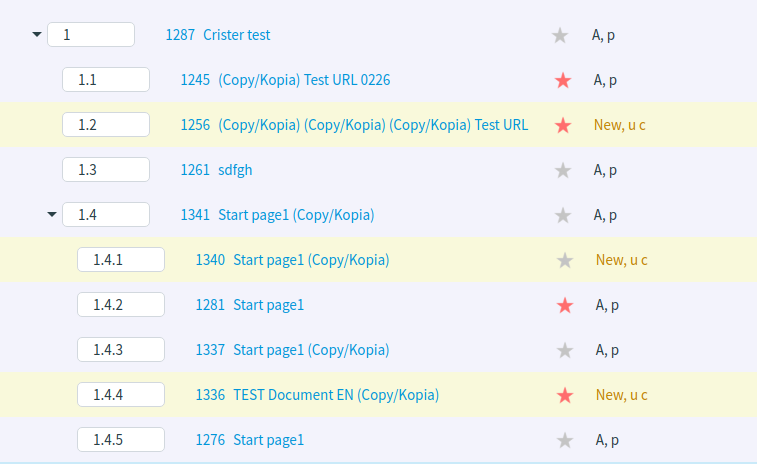
../_images/04-MenuEditorItemStructure.png

ImCMS provide easy way to order menu-item by drag-n-dropping. To order items click on required one and drug and drop it into/above/below another one.

../_images/05-OrderingMenuItems.png
Previous Next

© Copyright 2015-2022, ImCodePartnerAB. Revision 07c6cb49. Last updated on Nov 01, 2023.

Built with Sphinx using a theme provided by Read the Docs.